Open the app and see the next buses at the stops around you. Follow your bus on the map, get an alert before it arrives, and never miss the last ride home.
Free. Ads keep it free; a one-time purchase removes them. iOS 18.1 or later, Android 8 or later.
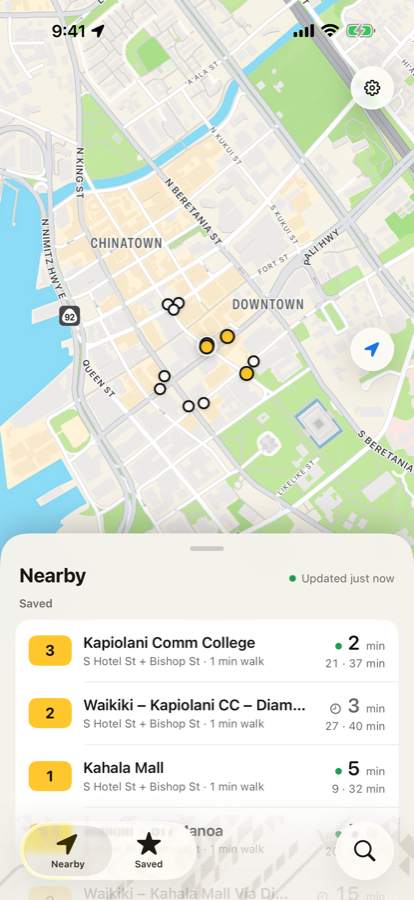
NearbyUpdated just now
2Waikiki – Kapiolani CCS Hotel St + Bishop St · 1 min walkNow
13Waikiki – UH ManoaS Hotel St + Bishop St · 1 min walk4min
1Kahala MallS Hotel St + Bishop St · 1 min walk9min
20Airport – PearlridgeS Hotel St + Alakea St · 3 min walk14min
The 2.0 redesign
Built around one question.
Every screen starts from “when is my bus?” and gets out of the way. One color for routes, big countdowns you can read from across the street, and nothing you don’t need.
Every stop, your way.
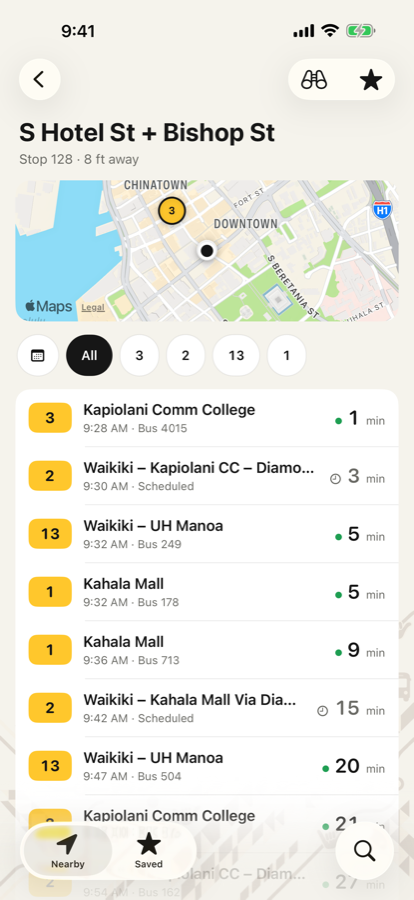
Open a stop and see what’s coming, filtered by route if you like. Live buses show a green dot; scheduled ones show a clock. A map shows the buses heading your way.
Late buses stay listed as “Due” for a few minutes instead of vanishing
The last bus of the night is marked
Timetables for any day, and Look Around imagery so you know where to wait
Follow your bus on its real route.
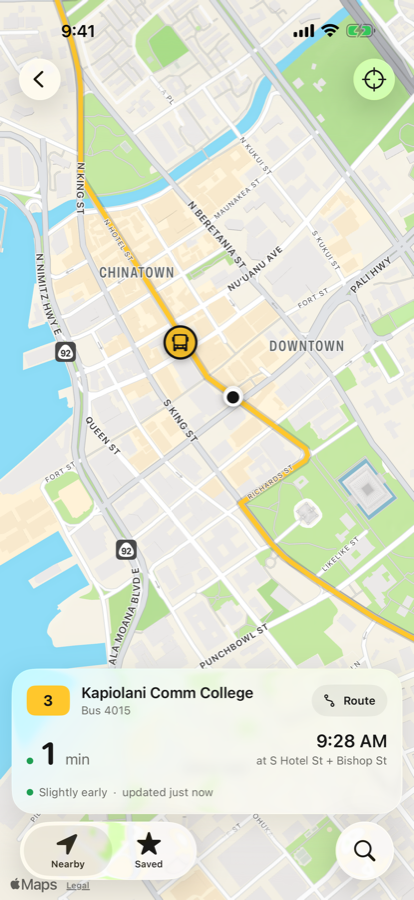
Tap any departure and watch the bus move along its line toward your stop, with a live countdown, the arrival time, and whether it’s running on time.
Arrival alerts. Get a notification 2 to 5 minutes before the bus reaches your stop
Live GPS for TheBus and Skyline on Oʻahu
The whole line at a glance.
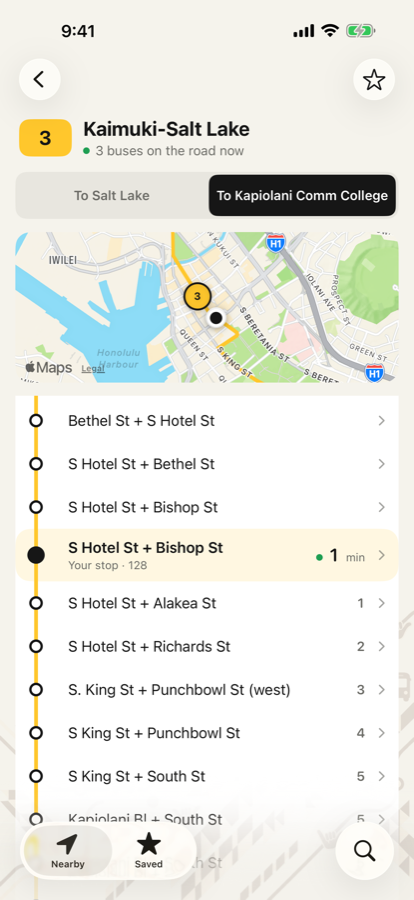
Tap a yellow route number anywhere and see every stop in order, the buses on the road right now, and your own stop highlighted with its countdown. Switch direction with one tap.
Estimated minutes to the stops after yours
Buses between stops show whether they’re on time
Your commute, one tap away.
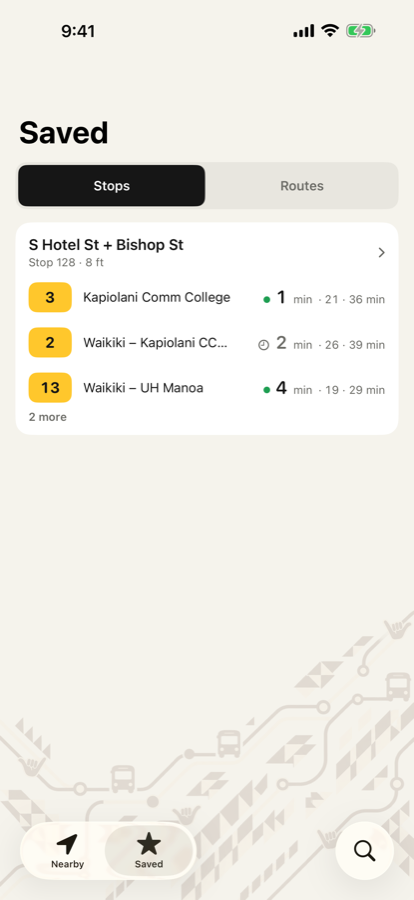
Star the stops and routes you use every day. The Saved tab shows your stops with their next buses at a glance, and search finds any stop by name or by the number on the sign.
More features
Arrival alerts
Not at the stop yet? Ask for an alert and your phone tells you when the bus is a few minutes out. Choose 2 to 5 minutes to match your walk.
Timetables
Full schedules for any route at any stop, for the next two weeks. Handy on Maui and Kauaʻi, where buses run to the timetable.
Search
Any stop by name or by the number on the sign. Any route by number or name. Recent searches stay one tap away.
Late buses stay visible
When a bus runs past its scheduled time it reads “Due” with how long ago, and stays listed for five minutes. It doesn’t just disappear.
Dark Mode
A full dark appearance for late rides, with the same yellow badges and the same easy-to-read countdowns.
Made for everyone
Works with VoiceOver, larger text sizes and Reduce Motion. Tap targets sized for real fingers, and colors that pass contrast checks in both modes.
Three islands, one app
Oʻahu, Maui and Kauaʻi.
The app picks your island from your location, or you can choose one in Settings to plan ahead before you land.
Oʻahu
TheBus and Skyline
Live GPS
Live arrivals at every stop
Buses moving on the map along their routes
Arrival alerts, route lines and timetables
Maui
Maui Bus
Schedules
Every stop and route on the island
Scheduled departures at each stop
Full timetables for the next two weeks
Kauaʻi
Kauaʻi Bus
Schedules
Every stop and route on the island
Scheduled departures at each stop
Full timetables for the next two weeks
Ready to ride?
Free to download. Ads keep it free, and a one-time purchase removes them for good.
Requires iOS 18.1 or later, or Android 8 or later.
Support
Questions, answered.
Is live tracking available on every island?
Live GPS is available for TheBus and Skyline on Oʻahu. Maui Bus and Kauaʻi Bus publish schedules, so the app shows scheduled times there, marked with a clock.
What does “Due” mean?
The bus’s scheduled time has passed but the agency still expects it. Buses run late sometimes, so the app keeps them listed as “Due” with how many minutes ago, for up to five minutes, instead of dropping them.
How do arrival alerts work?
Open any bus and tap “Alert me”. Your phone will notify you when the bus is a few minutes from your stop. Choose 2, 3, 4 or 5 minutes in Settings, depending on how far you have to walk. The first alert asks for notification permission.
Where did Favorites go?
They’re now the Saved tab. Tap the star on any stop or route to save it. Saved stops show their next buses right on the tab, and they appear at the top of Nearby when you’re close to them.
Does the app work offline?
Live arrivals, bus tracking and timetables need an internet connection. Your saved stops and routes are kept on your phone.
How accurate are the times?
Oʻahu times come from live GPS reports and are usually within a minute or two. Traffic and weather can move them. Maui and Kauaʻi times are the published schedule. All data is provided by Oahu Transit Services, Maui Bus and Kauaʻi Bus.
How do I remove ads?
Open Settings in the app and choose “Go ad-free”. It’s a one-time purchase. If you reinstall or get a new phone, use “Restore purchases” on the same screen.
Email us
Bugs, ideas, or a stop that looks wrong: apps@kantoprojects.com. We usually reply within a day.
About the data
Routes, stops and arrival times come straight from the transit agencies. If a stop has moved or a route changed, it will show in the app once the agency publishes the update.
 AllBusApp